A property website for every listing
Last updated 2026-11-25 · Venu Gopal Reddy Muvva, founder
ListingPhotoStudio creates a public webpage for every listing you process. The page shows your photos, floor plan, video, and agent information. You can share the link directly with buyers or agents.
Steps
- Process your photos. Upload your shoot and let the system edit the images. This ensures the gallery on the website looks professional.
- Add listing details. Enter the property address, price, beds, and baths. You can also add a custom description and social posts.
- Generate the website. On the listing page, click to publish the property website. It uses your studio branding and the listing's photos, video and floor plan.
- Share the link. Copy the unique URL for that listing. Send it to your agent or post it on social media to show the property to buyers.
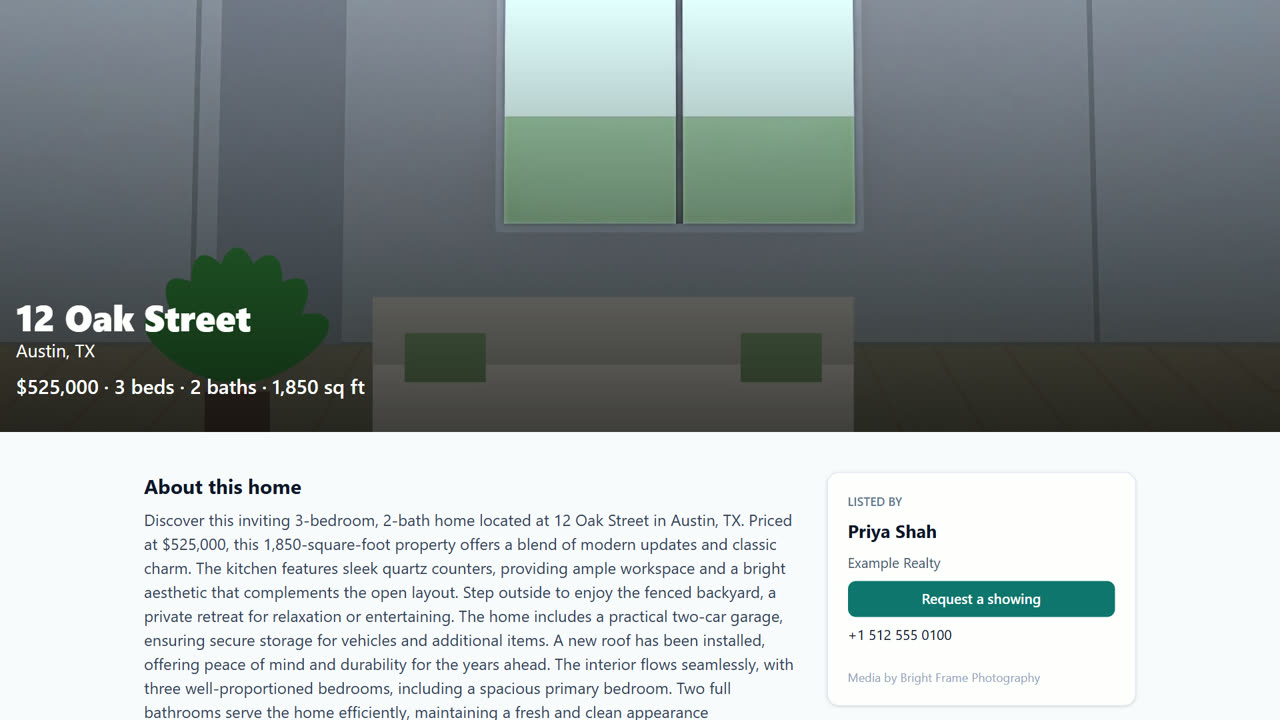
What is on the page
The property website includes a photo gallery, key facts like beds and baths, and the listing description. It also displays the floor plan and listing video if you created them. There is an agent card with contact details so buyers know who to call. The layout is clean and designed for mobile viewing. You do not need to write code or manage a domain name. The page is generated automatically from the data you entered in the listing editor.
Branding and identity
The website uses your studio name and brand color. This helps buyers recognize your work and builds trust. You can hide the 'Powered by' footer if you prefer a cleaner look. The design is consistent across all your listings. Agents see a professional page that reflects your studio's quality. This is useful for photographers who want to look like a full-service marketing team. The branding is applied automatically when you publish the page.
Sharing and access
Each listing gets its own web address. Share it by email, on social media or in print. The page is public: anyone with the link can view it without logging in. It shows what the listing has now, so if you change photos or the description, the page changes too.
Limitations to know
The website is one page for one property. It has no chat or lead form; buyers use the Request a showing button, which opens an email to the agent. It uses our web address, not your own domain: a custom domain is coming soon. It is not a search portal and does not sync with the MLS.
When ListingPhotoStudio is not the right tool
ListingPhotoStudio is not a full real estate management system. It does not handle transactions, contracts, or CRM pipelines. If you need a platform to manage leads, schedule viewings, or integrate directly with MLS for data syncing, use a dedicated real estate CRM. This tool focuses on creating the visual marketing assets and the property website. It is not for managing your entire business operations.
Questions
Can I use my own domain name?
No, custom portal domains are not available yet. The website uses our shared domain structure. This feature is coming soon, but for now, you must use the link we provide.
Does the website include a contact form?
No form. The agent card shows the agent's details, and a Request a showing button opens an email to the agent.
Can I update the website after publishing?
Yes. Change the listing's photos or details and the page shows the new version. The link stays the same.
Is the website mobile-friendly?
Yes, the property website is designed to look good on phones and tablets. Most buyers will view it on a mobile device, so the layout adjusts to fit smaller screens automatically.
Related
Free for your first 14 days. Then pay only for what you use.
Start free — 14 days on us