How to merge bracketed real estate photos (HDR)
Last updated 2026-11-25 · Venu Gopal Reddy Muvva, founder
ListingPhotoStudio merges your exposure brackets into a single HDR photo automatically. You can group files by matching names or by a fixed count of 3 or 5 images per photo.
Steps
- Name your files. Save your bracketed shots with a shared name, like kitchen_1, kitchen_2, and kitchen_3. This helps the tool group them correctly.
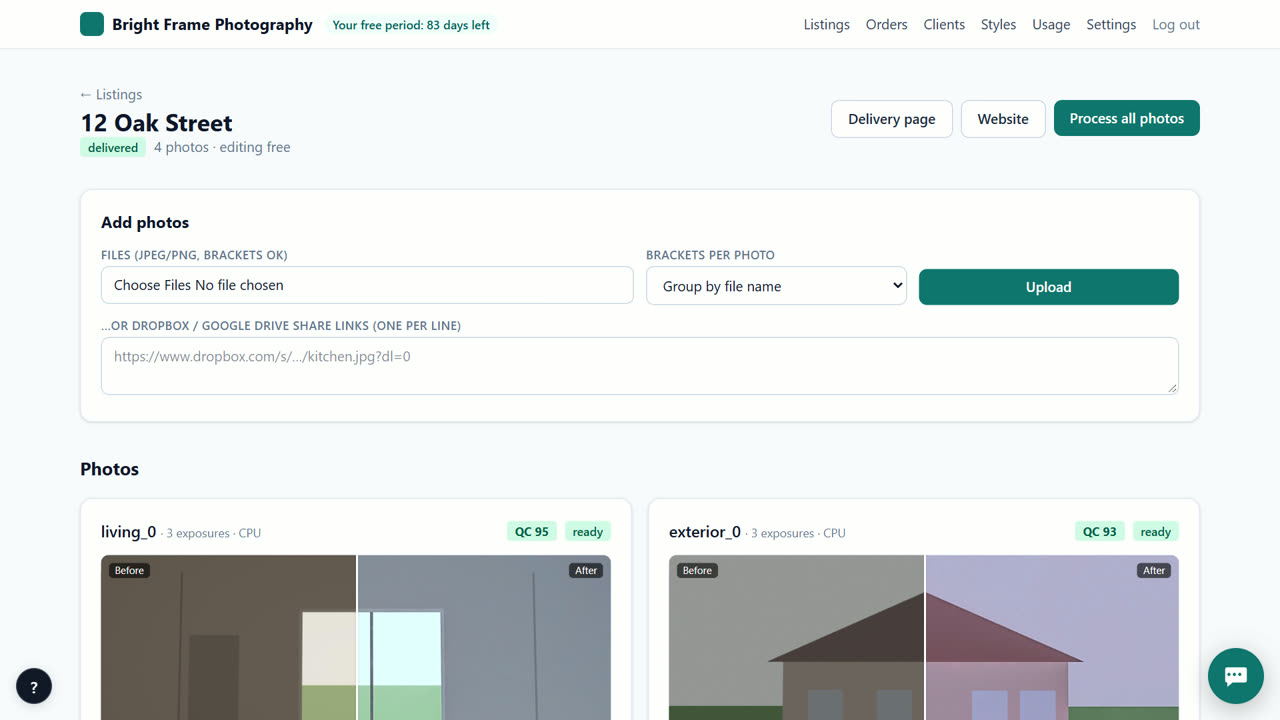
- Upload the shoot. Go to your listing page and upload the JPEG or PNG files. Pasting Dropbox or Google Drive share links also works (beta).
- Set the group count. If your file names don't share a prefix, choose a fixed count per photo (3 or 5) on the upload form.
- Process the photos. Click the Process all photos button. The system aligns the frames and fuses them into one image with clear details in bright and dark areas.
How the merge works
When you upload brackets, ListingPhotoStudio aligns the images to remove camera shake. It then fuses them into a single photo. This process recovers details in bright windows and dark corners. The result is an HDR image that looks natural. You do not need to adjust alignment manually. The system handles the technical steps so you can focus on the final look.
Grouping by file name
The easiest way to group brackets is by file name. If files are named living_1, living_2 and living_3, the tool knows they belong together and makes one photo. This works well when your camera or export names files in sequence. It saves you from setting a count by hand.
Grouping by fixed count
If your file names are random, use the fixed count option. Tell the system how many frames make up one photo, usually 3 or 5. The tool will group the first three files as one photo, the next three as another, and so on. This is useful for bulk uploads where naming was inconsistent. Just ensure your files are sorted correctly before uploading. The order matters for the merge to work properly.
When ListingPhotoStudio is not the right tool
This tool does not support RAW file uploads. If you shoot in RAW, you must convert to JPEG or PNG first. It also does not offer a Lightroom plugin. If you need to edit RAW files directly in Lightroom, you will need a different tool. This guide is for photographers who already have JPEG or PNG brackets ready to merge.
Questions
Can I use RAW files for HDR merging?
No, ListingPhotoStudio only accepts JPEG and PNG files. You must convert your RAW files to JPEG or PNG before uploading them for processing.
What happens if my brackets are not aligned?
The system automatically aligns the frames during the merge process. It corrects for minor camera movement so the final image looks sharp and stable.
Do I need to name my files specifically?
You do not have to, but it helps. If your file names share a prefix and numbers, the tool groups them automatically. Otherwise, you can set a fixed count per photo.
Related
Free for your first 14 days. Then pay only for what you use.
Start free — 14 days on us